Showing posts with label facebook. Show all posts

Sunday, November 20, 2016

Nemucod downloader spreading via Facebook


Earlier today, a friend of mine notified me of something strange going on with his Facebook account; a message containing only an image (an .svg file in reality) had been sent automatically, effectively bypassing Facebook's file extension filter:

'Photo_9166.svg'


What is an .svg file? From Wikipedia:

Scalable Vector Graphics (SVG) is an XML-based vector image format for two-dimensional graphics with support for interactivity and animation. The SVG specification is an open standard developed by the World Wide Web Consortium (W3C) since 1999.
This means, more specifically, that you can embed any content you want (such as JavaScript). Moreover, any modern browser will therefore be able to open this file.


Contents of our 'photo' are as follows:

Copy of file on Pastebin here


It's a heavily obfuscated script, which, after opening, redirects you to the following website:


Fake Youtube - "You must install the codec extension to watch this video."


A website purporting to be Youtube, including a video from Facebook - of course, you'll need to install an additional extension to view it :)

The extension has no icon and thus seems invisible and has the following permissions:


Currently, I'm not exactly sure what this extension is supposed to do beside spreading itself automatically via Facebook (harvesting your credentials in the process), but likely it downloads other malware to your machine.

One of my security colleagues had in fact noticed similar behavior and got ransomware (Locky) as payload:


The extensions' description can be one of the following, and seem semi-random. Note that other variations are possible:

One ecavu futolaz corabination timefu episu voloda 
Ubo oziha jisuyes oyemedu kira nego mosetiv zuhum

The Facebook security team as well as Google Chrome's store security team have been notified.

UPDATE 22/11/2016

  • The rogue Chrome extensions are removed from the store. 
  • Facebook is now filtering for SVG files as well:


Test.svg, containing just a window.alert() method


Removal


Remove the malicious extension from your browser immediately:


Additionally, run a scan with your antivirus and change your Facebook password afterwards.

Notify your friends you sent a malicious file, or in the other case, let your friend know he/she is infected. If you keep receiving the same message from your friend, you may want to temporarily block their messages.


Conclusion

As always, be wary when someone sends you just an 'image' - especially when it is not how he or she would usually behave.

Additionally, even though both Facebook and Google have excellent security controls/measures in place, something bad can always happen.

For those interested, all related files have been uploaded to VirusTotal, and their hashes and domains can be found, as always, on AlienVault's OTX:

Friday, October 11, 2013

Funny Facebook files deliver malware


I've recently got notified on an interesting malware campaign. I'll start with some screenshots:


Save the file and run! It is funny :)

DivX plug-in Required!


Download and execute the facebook app, please!


Some examples of files that can be downloaded:
IamFunnyPNG-facebook.com
IamFunnyPNG-fb.com
IamNakedBMP-facebook.com
IamNiceTIFF-fb.com
IamSexyPIC-fb.com
IamSexyPNG-fb.com
MeBitchTIFF-fb.com
MeFunnyJPG-facebook.com
MeNakedJPEG-fb.com
MeNakedPIC-facebook.com
MeNiceGIF-fb.com;
MeNicePNG-fb.com
MeSexyJPEG-facebook.com
MeSexyPNG-fb.com
YouNakedJPG-fb.com
YouNiceBMP-facebook.com
YouSexyJPEG-fb.com
YouSexyPIC-facebook.com
YouWhoreJPEG-facebook.com


I think you get the point here. Users are being socially engineered to download a file that seems to originate from Facebook. The file is supposed to be an image file (PNG, TIFF, BMP, JPEG and even "PIC") but is in fact an executable. The initial landing page also ends in names of females, for example "laura.html" or "birgitta.html" .


Let's take a look at one of the downloaded files:
IamWhoreJPG-facebook.com
MD5: 1273f3ea6ae76340270bab57b073b0b5
Anubis Result
Malwr Result
VirusTotal Result


Unfortunately I was unable to execute the malware, as I currently don't have a physical machine to test it. According to VirusTotal results, it may be a Trojan called Yakes or Tobfy:
Trojan:Win32/Tobfy is a family of ransomware trojans that targets people from certain countries. It locks your PC and displays a localized webpage that covers your desktop. This webpage demands the payment of a fine for the supposed possession of illicit material.

Some variants might also take webcam screenshots, play an audio message pretending to be from the FBI, closes or stops processes or programs, and prevents certain drivers from loading in safe mode - possibly to stop you from attempting to disable the trojan.
See: https://www.microsoft.com/security/portal/threat/encyclopedia/Entry.aspx?Name=Trojan%3AWin32%2FTobfy

According to Ydklijnsma, this specific campaign drops bitcoin miner malware. See:
There's a good blogpost by Brian Krebs on the subject of bitcoin mining malware:
http://krebsonsecurity.com/2013/07/botcoin-bitcoin-mining-by-botnet/


Most of the malware seems to be hosted via the domain registrar "Hong Kong Sun Network":
Hong Kong Sun Network - hosting multiple malicious websites


Some IPs that are involved - next to it their abuse contacts:


I'm betting it's safe to assume the worst and block these IPs (more investigation is needed though):
91.218.38.0/24
103.9.150.0/24
109.73.166.0/24
112.213.106.0/24
121.127.226.0/24
188.190.120.0/24

Most of the sites use the pattern described here:
If you're interested in some of the websites that are serving this malware, visit the following Pastebin:
http://pastebin.com/raw.php?i=8BqGPvhX
Note that links may still be live! 


Conclusion


  • Don't be fooled by websites that seem to resemble Facebook, always check the URL you are currently on before downloading or executing files
  • Install an antivirus and antimalware product and keep it up-to-date & running
  • Use a linkscanner to verify the integrity of a link on either http://www.urlvoid.com or https://www.virustotal.com/
  • Use NoScript in Firefox or NotScripts in Chrome to block malicious attempts on unknown sites
  • Running "funny Facebook files" will usually provide you with everything but fun


Monday, June 24, 2013

Gina Lisa Facebook scam


Yet another Facebook scam, this time luring users with a sextape from Gina Lisa, whom is apparently a German model:


Yet another Facebook scam: "Gina Lisa Sextape"


When you click on the link you get:
Verify your age first


When you click on the video to "verify your age" you are redirected to what appears to be a site for gambling, pokergames, etc....:

Subscribe and get a free bonus. Looks legit


I suspect you'll probably have to pay up sooner or later to continue playing. Stargames.com is apparently known for spamming blogs & other sites.

hXXp://hot-movie.pw - URLvoid Report
hXXp://stargames.com - URLvoid Report


This scam and/or spam will also post on Facebook on your behalf. Go over your Privacy Settings on Facebook and make sure you delete this "app" if you see it. Remove any posts you have made as well and report posts similar as this made by your friend(s).


Prevention

Pretty straightforward: do not click on any of these links, how tempting they might be ! Ask your friend if he or she knows what it means, and slightly hover over the post until the 'X' becomes visible. You can then mark the post as spam, and it will be removed from your friend's wall.

It might also help to install the WOT extension into your browser. (Compatible with most modern browsers)
WOT is a community-based tool and is therefore very useful for these kinds of scams, whereas other users can warn you about the validity.
More information and to download WOT: http://www.mywot.com/


Conclusion
To keep it short and simple:
don't fall for these types of spam/scam, most of the times it's pretty obvious it's fake.

Wednesday, February 20, 2013

Facebook in a different color? Nah, just a survey scam


I got messaged about an obvious scam on Facebook:


New Facebook colors!


Strangely enough, that person's Facebook color was still in blue. Is it possible this is just a scam? ;-)


Going to the application:

The application "Pick a col0r" requests your permissions


 Next screen....:
I choose the blue color. Oh, right...


You've won!


As with most applications like these, you first have to fill in a survey to get your Facebook in a different color. Obviously, you still won't be able to even if you have filled in all your information for a chance to win product X or Y.


The application will make the same post on your wall as in the first picture. To remove it:

Go to your privacy settings, applications and remove "Pick a C0lor".


Confirm the removal and check the box. 


 Conclusion

You cannot change the color of Facebook at this point, there is no dislike button, ....

All of these 'applications' point to survey scams where you fill in all your information and your inbox will be flooded with spammail. And no, you haven't won anything.


Wednesday, January 30, 2013

Facebook spam leads to Exploit Kit


To no wonders, the Blackhole Exploit Kit is still trying to infect users. One of the techniques commonly used is to send the victim an email from for example Facebook, Linkedin, Twitter, .... Asking to click on a link.

We'll take a small peek at those tactics. We received the following email:

You have received a new comment


Hi ,
You have disabled your Facebook account. You can restore your account at any moment by logging into Facebook using your old login email address and password. Subsequently you will be able to use the site in usual way.
Thanks,
The Facebook Team


Obviously, Facebook didn't disable your account at all. There are some factors to easily determine this email is fake:

  • The 'From' field says it's from "Facebook", however, the sender is clearly 'nondrinker@iztzg.hr'.
  • Have you disabled your account? If not, then there's no reason to receive this mail.
  • The subject and the content of the email do not match.
  • Hovering over the links in the email reveals the real URL, which are not Facebook URLs.


When clicking on any of the links, you are presented (after several redirects) with the Blackhole Exploit Kit (aka BH EK). It tries to load a Java exploit on the machine by firstly detecting which plugin and Java version you are using:

PluginDetect


The payload? Probably ransomware or a Banker Trojan.


You can find the full JavaScript and the infection source on Pastebin :
http://pastebin.com/9PgDTXsb


Prevention

Use the NoScript add-on in Firefox or NotScripts in Chrome to prevent this.
Use the WOT add-on to check on the status of a website.
Use your common sense and ask yourself the proper questions (see below).
Use a URL scanner if you're unsure about a URL. Some examples are VirusTotal, URLvoid and URLquery.


Conclusion

As usual with this kind of emails, be alerted and always ask yourself the proper questions:

Why did this get in my Unwanted Email or Spam folder if I normally get Facebook mails in my normal Inbox?
Why would Facebook send me this when my account isn't disabled at all?
Why are those links not pointing to Facebook websites?
Why is the sender not from Facebook itself? What can I see in the headers?

Use your common sense, update your 3d-party applications as well as Windows, and use a decent antimalware and antivirus product.

Tuesday, December 6, 2011

New Facebook scam

A new Facebook scam is spreading today, 6th of December. The interesting thing is that I have seen it posted in Dutch as well.

The method used is the same as in previous Facebook scams, see for example my earlier post:
New Facebook scam

Here is the post in question (in Dutch):


Classical scam post to lure users into clicking the link.

Here's what it reads:
WOW! Mijn profiel is ALLEEN VANDAAG AL 12 keer bekeken.. en ik kan zien dat er behoorlijk wat stalkers bijzitten LOL! Kijk zelf wie jou allemaal in de gaten houdt op #removed#

In English:

WOW! My profile has been seen 12 time ALREADY ONLY TODAY .. and I can see that quite a few stalkers are included LOL! See for yourself who's keeping an eye on yoy on #removed#


The link has been shortened by the bit.ly URL shortening service. While this service is not malicious on itself, it can also be used by persons with malicious intent, whether it would be hackers, malware authors, ... Or in this case scammers.

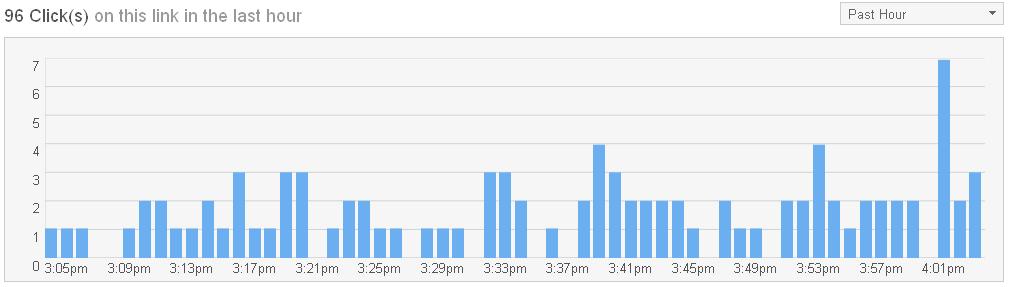
Let's review some stats for the bit.ly link first:


98 clicks on this link in the last hour


Top countries, including: France, Germany, The Netherlands


Facebook.com is the most referring site


At the moment of writing, there have been over 1,000 clicks on the link so far. I have already reported it to bit.ly and it should be taken down soon.

UPDATE: bit.ly has already issued a warning for when you click on the link. (12/07/2011)


Now let us analyse where the bit.ly link is taking us. The link can redirect you to different websites, but they will all (so far) redirect you to a page similar to this one (depending on your location):


Who is viewing your Facebook profile ?


You probably don't remember my post from February this year, but the concept is the same: you can supposedly view who's been "stalking", or viewing, your profile. This to attract users on clicking the link. Who doesn't want to see this, right ? Here is my post from early this year:
Facebook rogue applications still lurking around

You can presented with a screen like this (I have several, but I will only post one as example):

Are you the "lucky" winner ?

As stated previously, the concept is the same. Before you can see who's been viewing your profile, you need to fill in a short service to continue.

You may have won a prize, you may have won an iPad, you may have won free ringtones, you may have won a free iPhone application, etc, etc, etc, .... This is of course all a lie.
Remember: if it looks too good to be true, it probably is !

You have to fill in your email address and/or phone number to continue as well. At the end you will end up losing a lot of money, leaving your email address in the open and maybe worse.

Remember: if you click the link while logged in to Facebook, it will also post it on your own wall.


Conclusion

Conclusion is pretty straightforward: do not click on any of the links ! If in doubt, send your friend on Facebook (or if someone sent you the link) via PM if he or she knows what this is about.

To remove this from your or your friend's wall, click on the X on the message, and choose to "Report/Mark as spam" or "Remove Post".

You can also use a linkscanner to verify the integrity of a link on either http://www.urlvoid.com or https://www.virustotal.com/

To get some information on a bit.ly (or other URL shortener serivce) link, you can use any of the following websites:
- http://www.getlinkinfo.com/
- http://longurl.org/
- http://www.longurlplease.com/ (includes Firefox extension)

To report a malicious bit.ly link use:
http://bitly.com/a/report_spam

For any other question, do not hesitate to post a comment !

Sunday, June 19, 2011

New Facebook scam

There's a new Facebook scam actively spreading.

Titles as "Monstrously Erotic blonde", "This chick is awesomely crazy" and "Shows her boobs on national TV!" may appeal to the imagination.

Here's some examples:
Example #1

Example #2


Example #3

However, if you click on the link, it will not take you to a Blogger page but instead will redirect you right away to a page where you can see the "video":


You need to click "Jaa" twice to confirm you're over 18


It looks like a legit Facebook page and a Youtube video, but in fact it is all fake. If you click on "Jaa" (which appears to be Finnish for "Share"), you'll see the following page:


Ultimately you need to fill in a survey to see the video


Haven't we seen this type of scam before on Facebook ?
It is similar to the "See who stalks you on Facebook" application that was pretty viral some months ago.
I also made a blog post back then:
http://bartblaze.blogspot.com/2011/02/facebook-rogue-applications-still.html

You need to fill in a survey to see the video. Of course you might be attracted by the chance of winning an iPhone, but it is all fake.

The purpose of these scams are for you to send expensive text messages to 'unlock' the video. Don't be fooled, you'll only lose money by sending text messages !
Additionally, it will also make the same post on your wall (subject & link may vary), so your friends are targeted as well.


Prevention

Pretty straightforward: do not click on any of these links, how tempting they might be ! Ask your friend if he or she knows what it means, and slightly hover over the post until the 'X' becomes visible. You can then mark the post as spam, and it will be removed from your friend's wall.

It might also help to install the WOT extension into your browser. (Compatible with most modern browsers)
WOT is a community-based tool and is therefore very useful for these kinds of scams, whereas other users can warn you about the validity.
More information and to download WOT: http://www.mywot.com/


Conclusion

Although it's been a while since I encountered these types of scams, keep in mind that they may pop-up on your wall one day.

If so, follow the prevention tips mentioned above and all should be fine.


Wednesday, April 13, 2011

Facebook Support. Personal data has been changed!

There appears to be a new malicious email being sent out with the subject: "Facebook Support. Personal data has been changed! ID75300"

In a previous post I already explained a similar campaign:
Your FaceBook password has been changed


First of all, you would receive an email similar to this one:

Email claiming your personal data has been changed.


The email content is the following:

Dear user of FaceBook.

Your password is not safe! To secure your account the password has been changed automatically.

Attached document contains a new password to your account and detailed information about new security measures.

Thank you for your attention,
Administration of Facebook.


Your password from Facebook appears to be unsafe and you need to verify attached document to view your new login information. There is a file attached called "New_Password_NU44133.zip"

Inside the ZIP file you will find a file called New_Password.exe:


The file New_Password.exe is in fact not a Microsoft Word document, as you may suspect from the icon, but is in fact a malicious executable:

New_Password.exe
Result: 19/42 (45.2%)
MD5: 99a7cc6e674b94fbecef52f520c03dc3

The file also drops the following executable on the system:

aspimgr.exe
Result: 39/42 (92.9%)
MD5: 4531d9d75dab83c957122538b6fc92ba


The executable also tries to connect (called "phoning home") to download additional malware. However, at time of writing the URLs were offline.


Conclusion

If you receive emails like this, you should already be alerted:
"Why would Facebook send me an email my password has been changed ?"

The answer is simple: they don't. Whether you have Facebook or not, instantly delete the email and don't look back.