Tuesday, March 12, 2013

Exploits, exploits everywhere


It's the exploit season (especially for Java).

This time, I'm seeing a lot of mails supposedly from PayPal:

Apparently you bought an expensive watch. For someone you don't know.
Looks legit.


Originating IP of this mail:
188.33.40.190 - IPvoid Result

Seems to be sent out by the Cutwail botnet.


When clicking on one of the links (they all point to the same hacked webpage):

Adobe Reader giving a warning


Firstly, a blank webpage opens up and you're getting a PDF or Java exploit which is being launched.

Adobe crashes with a warning. Should raise some suspicions.


The latest trick the malware authors perform is to ultimately redirect you to a fake pharmacy:
'Pharmacy Express'. Fake pharmacy.

You are eventually ending up on this page, probably to make you think 'it was just Viagra spam, that's all'. Wrong! In fact, you're being infected as we speak. A file gets dropped to the %appdata% folder:

xydyswylmylh.exe
Result: 6/45
MD5: 22f3c0fd2a5d9e1799699097836bb5dc
VirusTotal Result
ThreatExpert Result
Anubis Result


There were a lot of HTTP connections, possible password stealer?


Additionally, it connects to the following IPs & ports: 

Malware was downloaded from:
188.93.211.151 - IPvoid Result

Adobe/PDF exploit being used: CVE-2010-0188 - CVE Report
Oracle/Java exploit being used: CVE-2013-0431 - CVE Report (tip from @eromang)


All files gathered, contact me for a copy:
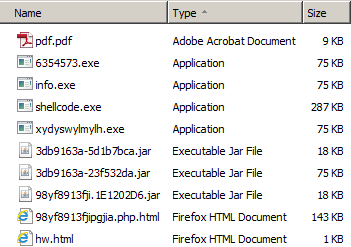
Gathered files in this attack


This spreading is still going on, if you'd like to know the source of these exploits (be careful though, they can still be live!), you can see these results from URLquery:


Conclusion


  • Don't click on any link(s) of unknown senders.
    In fact, don't even open mail from unknown senders.
  • Have you paid for an expensive watch for somebody you don't even know? I didn't think so.
  • Install an antivirus and antimalware product and keep it up-to-date & running. 
  • Use for example NoScript in Firefox to counter these attacks.
  • And above all: patch Java, Adobe and any other 3d party software you may have!


Tuesday, February 26, 2013

FedEx spam loads malware


Received an email from (supposedly) FedEx today, seems my parcel was unable to be delivered:

Print your receipt!


    Mail details:
Subject: Shipping Information‏


Sender: stoiciu_ro01@uhost.ro


X-Originating-IP: 195.78.124.42
Content: 
FedEx
Tracking ID: 1795-21492944
Date: Monday, 18 February 2013, 10:22 AM
Dear Client,
Your parcel has arrived at February 20.Courier was unable to deliver the parcel to you at 20 February 06:33 PM.
To receive your parcel, please, print this receipt and go to the nearest office.
Print Receipt  
Best Regards, The FedEx Team.
FedEx 1995-2013


The 'Print Receipt' button points to a filesharing website, where a ZIP file gets downloaded. Inside the ZIP is an EXE file with a neat little Word icon. When running the file:


Postal Receipt  information


You get a Notepad file with some information. Is your name Mark Smith? No? Then you're infected. Is your name Mark Smith? Then you're infected anyway. 

Does this behaviour look familiar? Well noticed, we've seen this in a post from some months ago:


Gathered files. Contact me for a copy.


Some more details about the downloaded file:
Postal-Receipt.exe
MD5: d335b890e1bc260a259b994533333d02
VirusTotal Report
Anubis Report
ThreatExpert Report


The following file was dropped in the %appdata% folder:
ujfhmdlk.exe
MD5: d335b890e1bc260a259b994533333d02
VirusTotal Report
Anubis Report
ThreatExpert Report


The malware tries to connect to the following IPs:

46.105.143.110
50.115.116.201
74.117.61.123
77.79.81.166
81.93.248.152
87.106.51.52
91.121.140.40
91.121.28.146
93.125.30.232
95.140.203.241
109.235.252.2
118.97.15.13
122.155.18.53
149.62.168.76
188.165.205.46
190.111.176.13
190.111.176
202.153.132.24
213.229.106.32
217.11.63.194


It performs the following GET request on port 8080, probably to download more malware.  
(I was however unable to reproduce any additional droppers or system modifications): /509A37A363A4A88C8B6BBD234F063B9CEE4072C470F04B0AB239C05FF89DA4B98D1E54BF77C0CD96CD8BC4004B3459C13194D0F9E0D64CF108A635F7468E817F408A20EF7149233F1356D2B3565F49


Conclusion
  • Don't click on any link(s) of unknown senders. In fact, don't even open mail from unknown senders.
  • Have you indeed ordered something? Check the status of it directly on the supplier's website.
  • Don't be fooled by the Adobe or Word icons, they are actually EXE files. You can enable an option in Windows so you're always sure of the filetype being used:
    Enable Viewing of Filename Extensions for Known File Types
  • Install an antivirus and antimalware product and keep it up-to-date & running. In this case, the payload is at least 4 months old! This should be easily detected by your antivirus product.


Wednesday, February 20, 2013

Facebook in a different color? Nah, just a survey scam


I got messaged about an obvious scam on Facebook:


New Facebook colors!


Strangely enough, that person's Facebook color was still in blue. Is it possible this is just a scam? ;-)


Going to the application:

The application "Pick a col0r" requests your permissions


 Next screen....:
I choose the blue color. Oh, right...


You've won!


As with most applications like these, you first have to fill in a survey to get your Facebook in a different color. Obviously, you still won't be able to even if you have filled in all your information for a chance to win product X or Y.


The application will make the same post on your wall as in the first picture. To remove it:

Go to your privacy settings, applications and remove "Pick a C0lor".


Confirm the removal and check the box. 


 Conclusion

You cannot change the color of Facebook at this point, there is no dislike button, ....

All of these 'applications' point to survey scams where you fill in all your information and your inbox will be flooded with spammail. And no, you haven't won anything.


Wednesday, February 13, 2013

New exploit kit tricks


In today's post, we'll be reviewing a (potentially) new trick by the exploit kit authors.

As usual, it all starts with.... a great portion of spam:

Verizon important account information! ;-)


When clicking on any of the links you get redirected of course.... and some tasty exploits are served.... See for more information on Pastebin links further below....

However, this time, when you don't have a vulnerable Java or Adobe version installed, you'll get redirected (after 61000 milliseconds ~1 minute to be exact) to another page where you can download the brand new version of Adobe Flash Player:


Download the new Flash Player... Note it's not the official Adobe website!


Of course this is not the real Flash Player, in fact, as far as I could find, this version does not exist.

Something that has always bothered me about the download of Flash is the notification circled in red. Yes, on the real website of Adobe, this notification is also present:
"You may have to temporarily disable your antivirus software" --> Great thinking, right?


The bad guys have basically just done a copy/paste of the download page of Flash and changed the version number. When clicking on Download now, you're presented with:


update_flash_player.exe
MD5: 1b7d3393018d65e9d37566089b7626d5
VirusTotal Report
Anubis Report
ThreatExpert Report


The payload seems to be Zeus/Zbot, it also phones home to:
88.190.210.199

Infection URLs from the same campaign, hat tip to @MalwareMustDie :
URLquery search results


Samples that were gathered, contact me if you'd like a copy:


Pastebin links for the Javascripts:
http://pastebin.com/hhQe6RCP
http://pastebin.com/nt5JmGp3


Conclusion

- Don't click on any link(s) of unknown senders. In fact, don't even open mail from unknown senders
- Patch your Java & Adobe or uninstall it if you don't need it
- Install an antivirus and antimalware product and keep it up-to-date & running
- Use NoScript in Firefox or NotScripts in Chrome


Wednesday, January 30, 2013

Facebook spam leads to Exploit Kit


To no wonders, the Blackhole Exploit Kit is still trying to infect users. One of the techniques commonly used is to send the victim an email from for example Facebook, Linkedin, Twitter, .... Asking to click on a link.

We'll take a small peek at those tactics. We received the following email:

You have received a new comment


Hi ,
You have disabled your Facebook account. You can restore your account at any moment by logging into Facebook using your old login email address and password. Subsequently you will be able to use the site in usual way.
Thanks,
The Facebook Team


Obviously, Facebook didn't disable your account at all. There are some factors to easily determine this email is fake:

  • The 'From' field says it's from "Facebook", however, the sender is clearly 'nondrinker@iztzg.hr'.
  • Have you disabled your account? If not, then there's no reason to receive this mail.
  • The subject and the content of the email do not match.
  • Hovering over the links in the email reveals the real URL, which are not Facebook URLs.


When clicking on any of the links, you are presented (after several redirects) with the Blackhole Exploit Kit (aka BH EK). It tries to load a Java exploit on the machine by firstly detecting which plugin and Java version you are using:

PluginDetect


The payload? Probably ransomware or a Banker Trojan.


You can find the full JavaScript and the infection source on Pastebin :
http://pastebin.com/9PgDTXsb


Prevention

Use the NoScript add-on in Firefox or NotScripts in Chrome to prevent this.
Use the WOT add-on to check on the status of a website.
Use your common sense and ask yourself the proper questions (see below).
Use a URL scanner if you're unsure about a URL. Some examples are VirusTotal, URLvoid and URLquery.


Conclusion

As usual with this kind of emails, be alerted and always ask yourself the proper questions:

Why did this get in my Unwanted Email or Spam folder if I normally get Facebook mails in my normal Inbox?
Why would Facebook send me this when my account isn't disabled at all?
Why are those links not pointing to Facebook websites?
Why is the sender not from Facebook itself? What can I see in the headers?

Use your common sense, update your 3d-party applications as well as Windows, and use a decent antimalware and antivirus product.